
Appearance
Test With Playground
Use the ChatBreeZ API Playground to confirm that your WhatsApp instance can send messages before you integrate the API into your application.
Requirements
Before testing in the playground, make sure you have:
- An active WhatsApp instance.
- A generated API Key.
- A recipient WhatsApp number with the country code and without the
+sign.
If you have not created an instance or API Key yet, follow the Get Started guide first.
Open the Playground
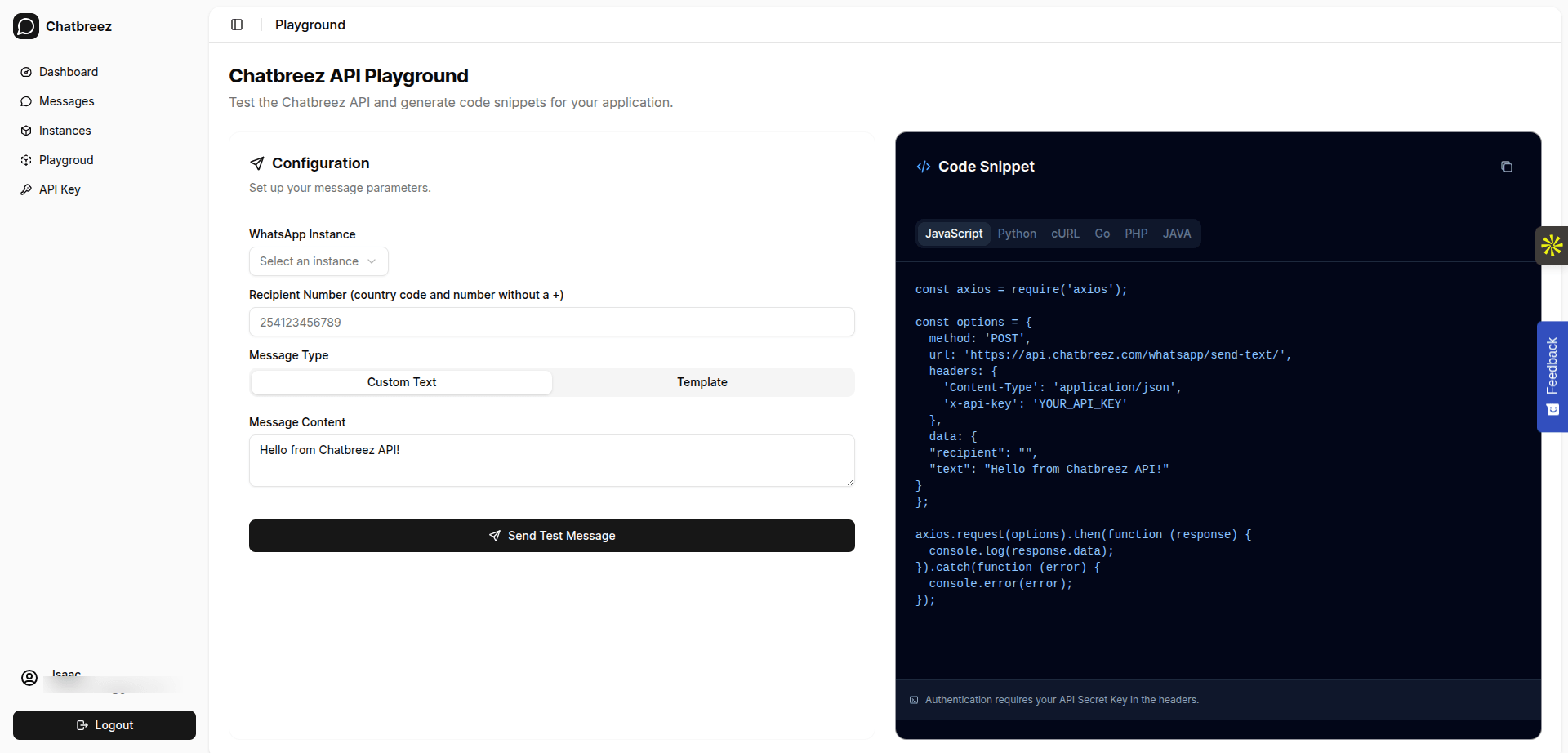
- Log in to your ChatBreeZ dashboard.
- Open Playground from the sidebar.
- Select your active WhatsApp instance.
- Enter the recipient number, for example
254123456789. - Choose Custom Text or Template.
- Enter your message content.
- Click Send Test Message.
If the message is delivered, your instance is connected and ready for API integration.
Copy the Generated Code
The playground generates code snippets using the instance, API Key, recipient, and message you entered. You can copy the snippet as it is and integrate it into your application.
The generated request uses this endpoint:
http
POST /whatsapp/send-text/:instanceExample Snippets
Replace instance with your instance name and YOUR_API_KEY with your generated API Key.
javascript
const axios = require('axios');

const options = {
  method: 'POST',
  url: 'https://api.chatbreez.com/whatsapp/send-text/{instance}',
  headers: {
    'Content-Type': 'application/json',
    'x-api-key': 'YOUR_API_KEY'
  },
  data: {
    recipient: '254123456789',
    text: 'Hello from ChatBreeZ API!'
  }
};

axios.request(options).then(function (response) {
  console.log(response.data);
}).catch(function (error) {
  console.error(error);
});
python
import requests

url = "https://api.chatbreez.com/whatsapp/send-text/{instance}"

payload = {
    "recipient": "254123456789",
    "text": "Hello from ChatBreeZ API!"
}

headers = {
    "Content-Type": "application/json",
    "x-api-key": "YOUR_API_KEY"
}

response = requests.request("POST", url, json=payload, headers=headers)

print(response.text)
bash
curl --location 'https://api.chatbreez.com/whatsapp/send-text/{instance}' \
--header 'Content-Type: application/json' \
--header 'x-api-key: YOUR_API_KEY' \
--data '{
  "recipient": "254123456789",
  "text": "Hello from ChatBreeZ API!"
}'
Troubleshooting
- If no instances appear, create a WhatsApp instance and make sure it is active.
- If the request fails with an authentication error, generate or confirm your API Key.
- If the recipient does not receive the message, confirm the number includes the country code and does not include
+.